
If you want to be kept up to date with new articles, CSS resources and tools, join our newsletter.
Polypane 30.1 adds selector specificity highlighting to the elements panel, a new server-sent HTML view in the sources panel, passkey support on Linux and a bunch of improvements and fixes. Like Polypane 30 this release is built on Chromium 152.
 What's Polypane? Polypane has everything a browser has, plus all the tools you need to build responsive, fast, accessible, and SEO-friendly websites and apps with multi-viewport synchronised previews, comprehensive device emulation and extensive accessibility tooling.
Selector specificity insights
Back in 2020 we launched Polypane's Elements panel, which pioneered showing the selector specificity of your styles right in the elements panel. Not much later we added an online specificity calculator that you could open from the Elements panel to explain selectors.
In Polypane 30.1, we're taking this a step further.
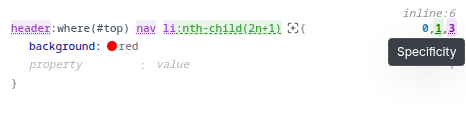
When you hover over a selector in the elements panel, Polypane will now highlight the parts of the selector that contribute to its specificity. It works for plain selectors:
and for nested selectors as well:
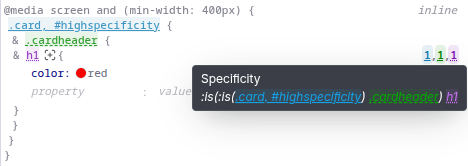
When you nest CSS, Polypane shows the resolved selector for the nested rule in the tooltip so you know what the engine is doing under the hood. And now this is of course also highlighted!
For nested CSS selectors, you can see that not only does it highlight the parent selector values, but is also intelligent enough to know that .card, #highspecificity counts as a single ID selector, even if #highspecificity is not part of the DOM.
Lastly, If you have a complex selector with lots of nesting, Polypane's highlighting will drill down to highlight the pertinent parts, rather than listing the single top-level wrapped :is() as being one value:
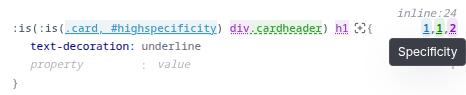
Drilling down into the selector required us to rebuild our specificity calculation engine, but the end result is an even more robust, accurate and understandable specificity.
We made all of these improvements available in our free online specificity calculator as well, so check it out!
Gap values in Peek tooltip
When you use the Peek tool to inspect an element, Polypane will now show you the gap values in the tooltip. Just like the Padding and Margin values, this lets you quickly check the gap values without needing to go to the Elements panel and finding the right declaration.
Passkeys support on Linux
Polypane has had support for passkeys/webauthn on Windows and Mac, which both have operating-system backends to support them, and now Linux support has been added as well. The Linux implementation uses software passkeys through 1Password's passkey-rs library.
Because the Linux implementation does not rely on a platform backend it comes with a custom UI:
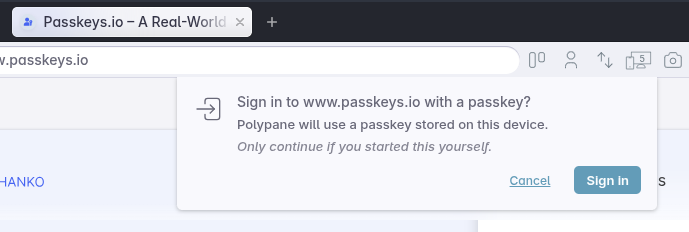
This brings parity between the three platforms when it comes to passkey support, and allows you to test your passkey implementations on all three platforms!
Server-sent HTML view in the sources panel
The sources panel now has a new toggle to switch between the rendered HTML (after your JS has run) and the plain server-sent HTML (before your JS has run). This is useful for debugging server-side rendering issues, and for checking that your server is sending the correct HTML to the browser.
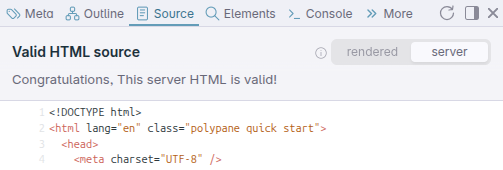
Both sets of HTML are validated individually, so you can also easily see where HTML validation errors are being introduced.
Updated placeholdifier debug overlay
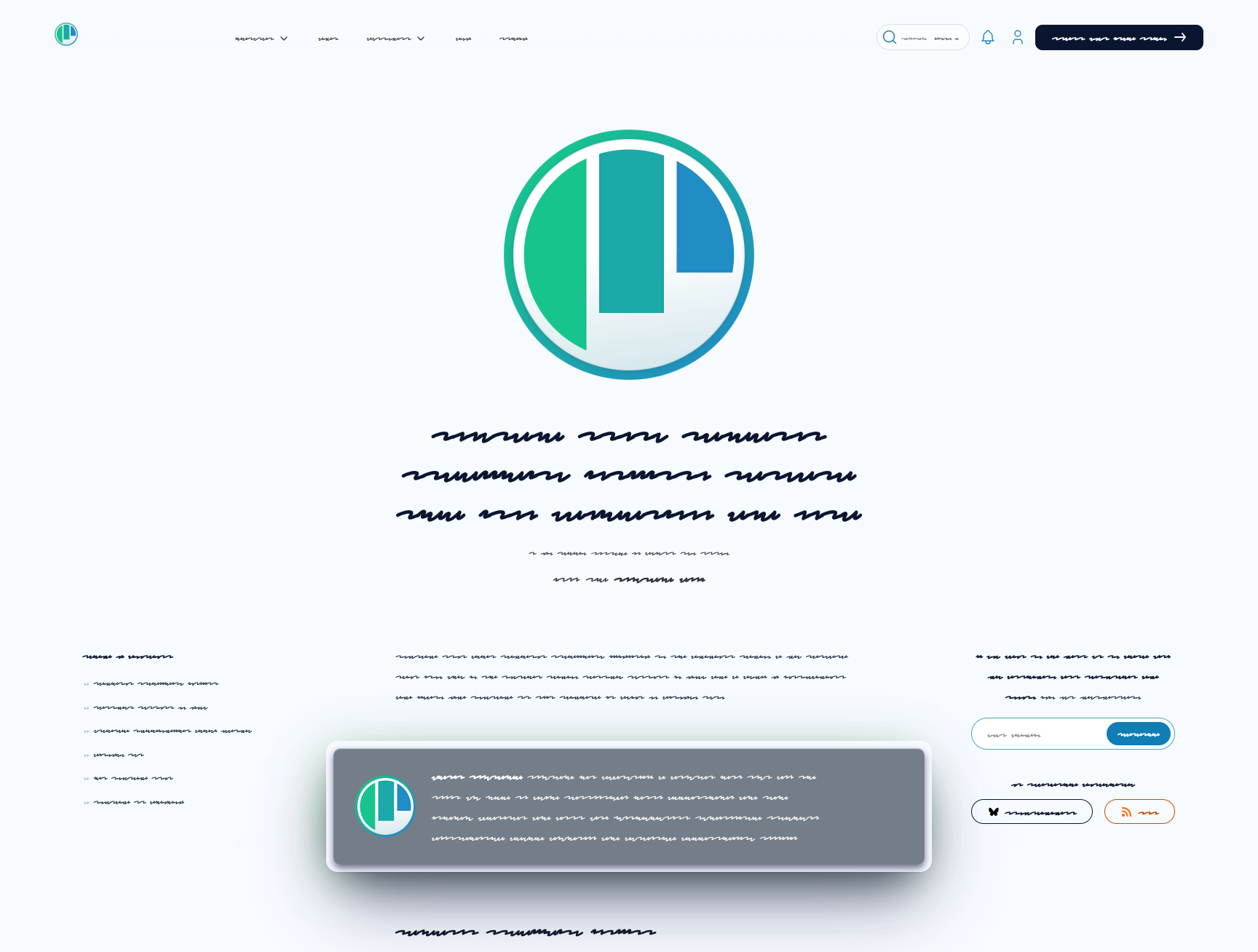
We've updated our placeholdifier debug overlay to use a scribble-style font instead of the block font we used before. This makes the blocked content more "text-like" and makes it easier to focus on the design instead of the content.
Chromium 152
Polypane 30.1 is built on Chromium 152. For all the experimental features enabled in this release, check out the experimental web platform features overview.
Get Polypane 30.1
Polypane is available for Windows, Mac, and Linux in 64-bit and ARM versions. Polypane automatically updates, but you can also go to the download page to download the latest version!
Don't have Polypane yet? There is a 14-day trial available.
Try it for free. No credit card needed.
Polypane 30 Changelog
New
- New Elements panel: Highlight specificity parts in selector
- New Source panel: Toggle between rendered and server-sent HTML (Thanks Matija!)
- New Passkey/Webauthn support for Linux
- New Updated Chromium
Improved
- Improved Accessibility panel now also checks for WCAG 2.2 2.5.8 target size
- Improved Meta panel: Show a warning for multiple viewport declarations (Thanks Matija!)
- Improved Meta panel: improved header order design and updated ruleset
- Improved Elements panel: After inspecting an element the DOM tree is now focused
- Improved Peek: show gap values in tooltip
- Improved Debug tools: Placeholdifier now uses a scribble instead of a block font
- Improved Find in page has improved performance
- Improved Browse panel: Basic auth popups are now shown in the browse panel
- Improved Panel: focuses the first ordered panel on launch
Fixes
- Fix Copy image to clipboard works again
- Fix Domain custom color was in wrong position in split views
- Fix Detached network panel shows data again (Thanks Eric!)
- Fix Detached panel window shows overflow menu again
- Fix Elements panel: Misaligned layout debugging badge for html element
- Fix Elements panel: specificity explainer link works again
- Fix Devtools panel: Issue on linux where the panel would not show content
- Fix Recording: pages without an explicit background color now record on white instead of black
- Fix Peek: decouple showing font-weight from showing line-height value
- Fix Peek: prevent peek from showing when inspection mode is chrome devtools
- Fix Browse panel: Shortcuts now work in detached panel too

