Documentation
Learn how Polypane improves your workflow
Layout debugging
With the shortcut ⌘ d you can quickly toggle layout debugging in your panes. This adds outlines to all the HTML elements on the pages letting you quickly analyze the HTML structure and find out which elements are causing layout issues.
It's like adding * { outline: red}, except much faster with different colors for different elements and support for pseudo elements.
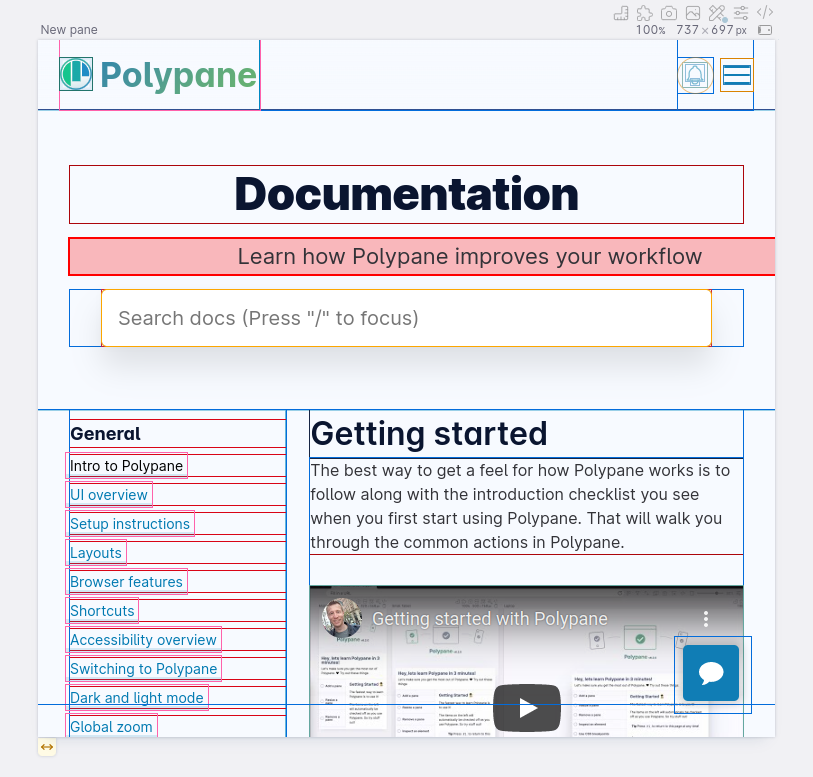
This debug tool can also be applied on a single pane using Debug tools, where it's called "Layout debugging".
Indicator in address bar
When layout debugging is active, a small indicator will appear on the right in the address bar. This way you can quickly see if the global layout debugging is active.

Click the indicator to disable layout debugging.
Detecting horizontal overflows
Elements that cause a horizontal scroll bar/horizontal overflow are highlighted in red, making it easy to spot them. See Horizontal overflow detection for automatic detection before layout debugging is needed.
Read more about detecting horizontal overflows.
More layout debugging
The Debug tab in the Elements Panel shows you information on the offset parent and stacking context of each element along with CSS properties like display, position and overflow that are often the cause of layout issues.
To learn more about these concepts, check out our article Offset parent and stacking context: positioning elements in all three dimensions.
Have a question about Polypane?
Reach out via (real human) chat, Slack or our contact form:
Contact SupportBuild the way you already build, without missing anything.
Free 14 day trial, no credit card needed.
- 1 Create your account. Takes a minute.
- 2 Download the app. For Windows, Mac & Linux.
- 3 Build your next project with Polypane

